In this video, you'll learn how to update your billing information. There are also text-based instructions with screenshots below the video.
Instructions
To update your billing information, log in with your current credentials.
Then click where you see your name in the upper-righthand corner and click on "Billing Information" in the dropdown menu.
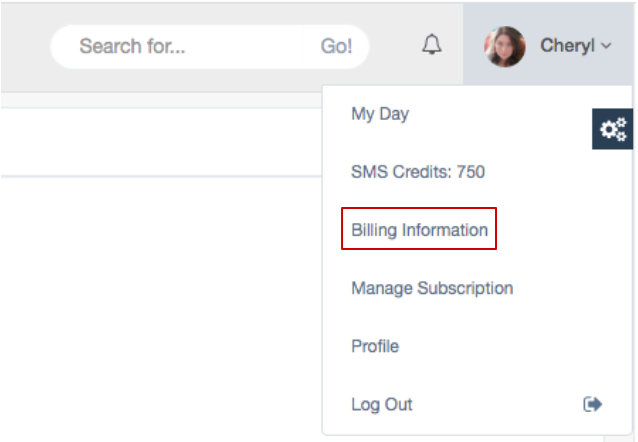
Once you're on the Billing page you'll notice your existing credit card information does not appear there. For security reasons, you financial information is stored only in a separate payment app.
You can use any major credit card including Visa, Mastercard, Discover, and American Express or your bank debit card.
Type your credit card number, the expiration date, and the CVV code which is typically a 3 or 4 digit number on the back of your card. Make sure you type your name as it appears on your card and click the "Update Billing Info" button.
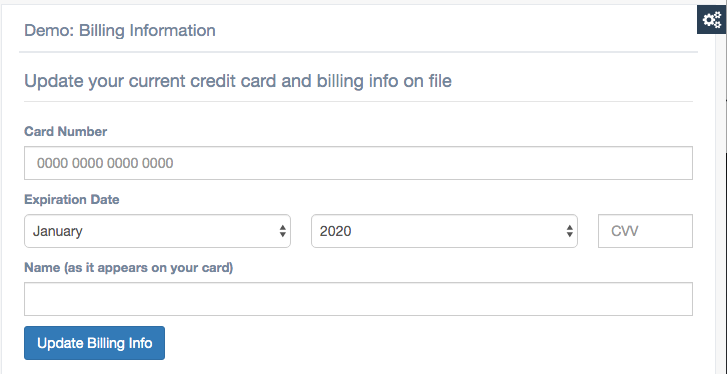
Once you have saved your billing information, it will once again be stored only in the payment application. For your security, it's not stored on your billing page.
Your monthly subscription fee will now be billed to the card you've most recently saved.
Comments
0 comments
Article is closed for comments.